
Yes, you can sell digital products on Etsy, and the highest-probability winners are practical files buyers use right away: printables, planners, templates, SVG files, clipart, and spreadsheets. These products scale well because delivery happens automatically once a buyer pays. Success depends on realistic file-size limits, fee-aware pricing, and listings built for Etsy’s search system.
TL;DR:
- Etsy sellers should focus on practical digital files like printables and templates that buyers can use immediately for better sales and clearer messaging.
- Files must be formatted correctly—PDF for printables, PNG/JPEG for images, SVG for cutting files, and ZIP for bundles—and tested on mobile devices before listing.
- Pricing strategies should account for all fees, including listing and transaction costs, and bundling or licensing options can boost profitability without lowering prices.
- Accurate Etsy SEO through well-crafted titles, tags, attributes, and quality images significantly increases product discoverability and conversion rates.
- Sellers need to track earnings, fees, and taxes carefully from the start, and use watermarking and licensing terms to mitigate digital piracy risks.
Table of Contents
- 1. Best-selling digital product types on Etsy
- 2. How to create files that actually work for buyers
- 3. How to list digital products on Etsy, step by step
- 4. Pricing and fees: keeping your shop actually profitable
- 5. Get found and get sales with Etsy SEO and marketing
- 6. Operations: delivery, support, and avoiding common pitfalls
- 7. Taxes and policies you need to know
- 8. Why this guide reflects how Etsy sellers actually operate
- 9. Strategies for protecting digital products from unauthorized sharing
- 10. What actually drives a profitable Etsy shop
- FAQ
- Sources
1. Best-selling digital product types on Etsy
Etsy buyers gravitate toward products that solve a task the moment they download it. That immediate utility, visible in your listing photos and description, is what turns a browser into a buyer, according to practitioner guidance on selling digital products.
Some categories consistently perform well because they fit this pattern:
- Printables: wall art, wedding signage, and checklists that buyers print at home for an immediate decorating or organizing fix.
- Planners and journals: daily, weekly, or goal-tracking layouts for digital notebook apps or home printing.
- Templates: resumes, invitations, social media graphics, and business forms that save buyers hours of design work.
- SVG files and clipart: cut-ready designs for Cricut and Silhouette crafters who need files formatted for their machines.
- Spreadsheets: budget trackers, meal planners, and project management sheets built in Excel or Google Sheets.
Within each category, sellers typically offer three kinds of micro-offers. A single printable sells as a quick, low-commitment purchase. A themed bundle (say, twelve monthly budget templates sold as one set) raises average order value without extra production work. A commercial license add-on, sold separately from the personal-use file, lets small business owners use your design on products they resell, which opens a second price tier for the same artwork.
Buyers expect clarity on what they are getting before they click buy. A listing that states the file formats included, the intended use (print at home, digital planner app, cutting machine), and whether a commercial license is available tends to convert better than one that leaves those details vague. Licensing confusion is one of the most common reasons buyers message sellers before purchasing, so stating the terms in the first few lines of your description heads off that back and forth.
2. How to create files that actually work for buyers
A beautiful design that will not open on a buyer’s phone generates refund requests, not five-star reviews. Matching the file format to how the product gets used matters as much as the design itself.
Use these format conventions as a starting point:
- PDF for anything meant to be printed: planners, wall art, worksheets, and invitations.
- PNG or JPEG for digital art, social media templates, and clipart that buyers will view or layer in design software.
- SVG for cut files destined for Cricut, Silhouette, or other cutting machines.
- XLSX or Google Sheets links for budget trackers, calculators, and spreadsheet templates that need formulas to stay functional.
- ZIP files for bundles containing multiple formats or multiple pages, so buyers download one file instead of several.
You do not need expensive software to produce any of these. Canva handles printables, planners, and social templates well and exports directly to PDF or PNG. Adobe Illustrator or the free alternative Inkscape handle vector work for SVG files. Google Sheets works fine for spreadsheet products and avoids compatibility issues some buyers have with Excel macros.
File size causes more support headaches than design quality does. Etsy caps uploads at 20 MB per file with a maximum of five files per listing, so a 40-page planner often needs splitting into chapters or compressing into a ZIP archive. Before publishing, download your own files on both a desktop browser and a phone browser to confirm nothing breaks in transit.
A short README file, even one page, cuts down on confused messages after the sale. Include your recommended print settings (paper size, margins, color mode), any software needed to open editable files, and a line explaining what the license does and does not allow.
Pro Tip: Test every file on a phone browser before you publish, since a large share of Etsy traffic happens on mobile and the Etsy app itself does not support digital downloads.
3. How to list digital products on Etsy, step by step
Etsy gives sellers two listing structures for digital goods, and choosing the right one shapes both your workflow and your price point.
Instant download listings deliver the file automatically the moment payment clears. This is the format that scales, since you are not involved in each sale after the files are uploaded. Made-to-order listings work for products that need personalization, such as a custom name added to a printable, and you complete and upload the finished file manually after the order comes in through Etsy’s digital listing tools.
To publish a listing:
- Create a new listing and set the item type to Digital files rather than a physical product.
- For instant downloads, upload your files directly to the listing; Etsy allows up to five files per listing, with a 20 MB ceiling on each file.
- For made-to-order items, select Made To Order, then upload the completed, personalized file through Shop Manager once the buyer’s order comes in.
- If a file exceeds the size limit or you need more than five components, zip related files together or split a large file into parts, and note the workaround in your description so buyers know what to expect.
- Fill in the title, tags, attributes, and category fields completely, since these fields drive how Etsy’s search surfaces your listing to shoppers.
Listings with complete attributes, accurate tags, and clear photos of the product in use tend to rank and convert better than sparse ones, even when the underlying file is identical. The listing fields are not just paperwork: they are the main signal Etsy’s search algorithm uses to match your product to a shopper’s query.
4. Pricing and fees: keeping your shop actually profitable
Etsy’s revenue cut has several layers, and treating gross sales as income is the fastest way to misjudge how your shop is performing. Etsy charges a $0.20 listing fee per item, a 6.5% transaction fee on the displayed price, and separate payment processing fees that vary by location, according to Etsy’s fee policy. Advertising costs and any refunds come out of that same pool.
A $10 digital download does not net $10. After the $0.20 listing fee and the 6.5% transaction fee, plus payment processing, a seller typically keeps significantly less than the full sale price before accounting for ad spend, according to Etsy’s own fee breakdown. Run that math on your actual sale volume before setting a price you think sounds competitive.
A few pricing moves protect your margin without undercutting your shop’s position:
- Bundle related items so the transaction fee and listing fee are spread across a higher order value instead of charged repeatedly on single low-price items.
- Offer a commercial license tier priced higher than the personal-use file, since business buyers often pay more for usage rights.
- Discount sparingly and with a clear end date, since constant markdowns train shoppers to wait for the next sale instead of buying at full price.
Before you set a final price, build a simple worksheet: display price minus listing fee, transaction fee, processing fee, average ad spend, and expected refunds equals your contribution per sale. Multiply that by the volume you expect in a month to see whether the shop is worth the time you are putting into it. Our guide to smart budgeting habits walks through building that kind of simple model for any income stream, not just an Etsy shop.
5. Get found and get sales with Etsy SEO and marketing
A well-made product that nobody sees will not sell. Etsy’s search algorithm leans heavily on your title, tags, and attributes to decide which shoppers see your listing.
Treat these fields as functional, not decorative:
- Title: lead with the words a shopper would actually type, such as “weekly budget planner printable” rather than a vague, branded phrase.
- Tags: use all available tag slots with specific phrases buyers search, mixing broad terms with more specific long-tail ones.
- Attributes: fill in every dropdown Etsy offers for your category, since these feed directly into search filtering.
- Photos: show the product in use, mock up a printed planner on a desk or a phone screen displaying the digital art, rather than a flat, uncontextualized file preview.
Outside of Etsy’s own search, Pinterest tends to be the strongest free traffic source for printables and planners, since the visual, idea-driven format matches how people browse that platform. Instagram and niche Facebook groups work for art and template sellers who can show their process. An email list, even a small one, gives you a direct channel for launching new products without depending entirely on Etsy’s algorithm. Etsy Ads can supplement these once you have a listing converting well organically, since boosting a weak listing mostly wastes spend.
Run small, deliberate tests rather than overhauling everything at once: change one photo, one title phrase, or one price point, then watch the data for a couple of weeks before changing something else. That isolates what actually moved the needle.
6. Operations: delivery, support, and avoiding common pitfalls
Most post-sale problems trace back to confusion, not product quality. Buyers download instant files from their Purchases page on Etsy.com, and the Etsy app does not currently support downloading digital files, so a buyer on their phone may need to switch to a mobile browser. Stating this plainly in your listing and README prevents a wave of “I can’t find my file” messages.
For made-to-order products, set a clear turnaround window in your listing and stick to it. A buyer who knows to expect a file in 24 hours is far more patient than one left guessing.
A few habits keep refunds and disputes rare:
- State your refund policy in the listing itself, since digital goods are generally non-returnable but buyers appreciate knowing the exception process upfront.
- Watermark preview images so browsers see the design without being able to lift a usable file from the listing photos.
- Avoid unlicensed PLR content, since reselling pre-made bundles without clear rights invites both buyer complaints and policy problems.
Pro Tip: Answer support messages within a few hours when you can. A fast reply to a confused buyer often prevents a refund request entirely.
7. Taxes and policies you need to know
Income from your Etsy shop counts as taxable self-employment income from the first dollar, regardless of how small the shop stays. The IRS Self-Employed Individuals Tax Center notes that self-employed people generally must file an annual return, may owe self-employment tax, and often need to make quarterly estimated payments throughout the year.
Keep these habits in place from your first sale:
- Track gross sales, Etsy fees, software subscriptions, and ad spend separately, since these figures feed directly into your Schedule C and estimated tax calculations.
- Set aside a portion of each payout for taxes, rather than treating the full deposit as spendable income.
- Review Etsy’s seller standards on originality and disclosure, since Etsy’s policy requires items to be designed, handpicked, or sourced by the seller and expects proper disclosure of AI-assisted or third-party content.
- Treat reselling PLR or MRR bundles with caution, since Etsy’s standards place responsibility for legitimate sourcing on the seller.
A tax professional familiar with self-employment income can tailor estimated payment amounts and deduction tracking to your specific situation, which general guidance like this cannot replace.
8. Why this guide reflects how Etsy sellers actually operate
This guide draws on Etsy’s own seller documentation, including its digital listing instructions, fee policy, and seller standards, along with the IRS guidance that governs self-employment income in the United States. This site focuses on breaking down financial decisions, including the ones tied to side income like an Etsy shop, into steps readers can act on without a finance background. For specifics tied to your own shop or tax situation, the linked Etsy Help pages and the IRS site remain the sources to check directly.
9. Strategies for protecting digital products from unauthorized sharing
Digital files are easy to copy, and no platform tool fully prevents a buyer from sharing one after purchase. A few practices lower the risk without making the buying experience harder.
Watermark your preview images visibly enough that someone cannot screenshot a usable version straight from your listing photos, while keeping the actual delivered file clean. State your license terms directly in the file itself, not just in the listing description, since a PDF that travels beyond the original buyer still carries the terms with it. Low-resolution previews paired with a full-resolution delivered file strike a reasonable balance between showcasing the product and protecting it.
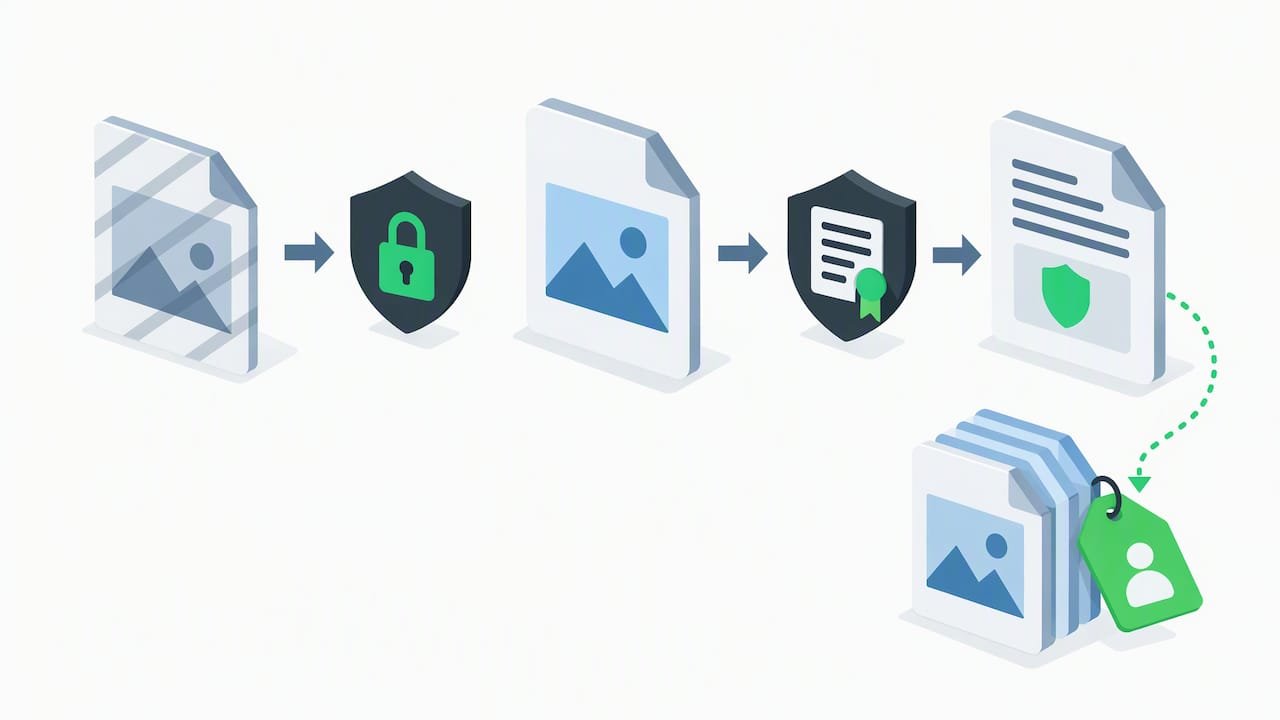
Some sellers embed a visible or hidden identifier, like a faint buyer-specific watermark, though this adds production overhead that may not be worth it for a low-priced single printable. It tends to make more sense on higher-priced bundles or commercial-license products where the financial stakes of unauthorized reuse are higher.
Ultimately, piracy risk is part of the cost of doing business with digital goods, similar to how retailers accept some shrinkage. Pricing that accounts for a small amount of leakage, rather than chasing every possible copy, tends to be a more sustainable approach than spending excessive time policing reuse.
10. What actually drives a profitable Etsy shop
The sellers who do well treat each new listing as a small test, not a single bet, and they pay closer attention to contribution margin than to top-line sales. Bookkeeping and fast customer replies protect profit as much as the designs do.
— Jasmine
FAQ
What digital products sell best on Etsy?
Printables, planners, templates, SVG cut files, clipart, and spreadsheets tend to perform well because buyers can use them immediately after download. Products that solve a specific task, like a budget tracker or a wedding invitation template, convert better than generic or purely decorative designs.
Can you make $10,000 a month on Etsy?
Etsy does not publish per-seller earnings data, so there is no official figure to point to for typical monthly income. Outcomes depend heavily on product selection, pricing, and how consistently you list and market new items, and most sellers build toward meaningful income gradually rather than overnight.
How much does Etsy take from a $100 sale?
Etsy charges a $0.20 listing fee plus a 6.5% transaction fee on the displayed price, along with separate payment processing fees that vary by location, according to Etsy’s fee policy. The transaction fee is 6.5% of the displayed price, with processing and listing fees reducing your take-home further.
Do I need an LLC to sell digital products on Etsy?
Etsy does not require an LLC to open a shop, and many sellers start as sole proprietors. Regardless of business structure, the IRS considers this self-employment income, so you are responsible for tracking profit and may owe estimated taxes even without forming a formal entity.
How do I start selling digital products on Etsy with no experience?
Start with one simple product, like a single printable or template, built in a free tool like Canva, and list it as an instant download following Etsy’s digital listing steps. Our roundup of free financial wellness tools can help you track the income and expenses once sales start coming in.
Sources
- How to Manage Your Digital Listings – Etsy Help
- Fees & Payments Policy – Our House Rules | Etsy
- Self-employed individuals tax center | Internal Revenue Service